FREE IMPLEMENTATION — On any plan purchased annually: setup, branding and team training included.
Recruitment, selection and onboarding

Staff vacancies without emails, spreadsheets or shared folders

A web platform that digitises the entire cycle: from publishing the vacancy to onboarding the selected person. A single, traceable and auditable process, built for the demands of the Chilean public sector.

Public application portal Sequential reference number and ID validation Traceability and audit trail Law 21,719 and Law 21,015 99,98% SLA on both plans
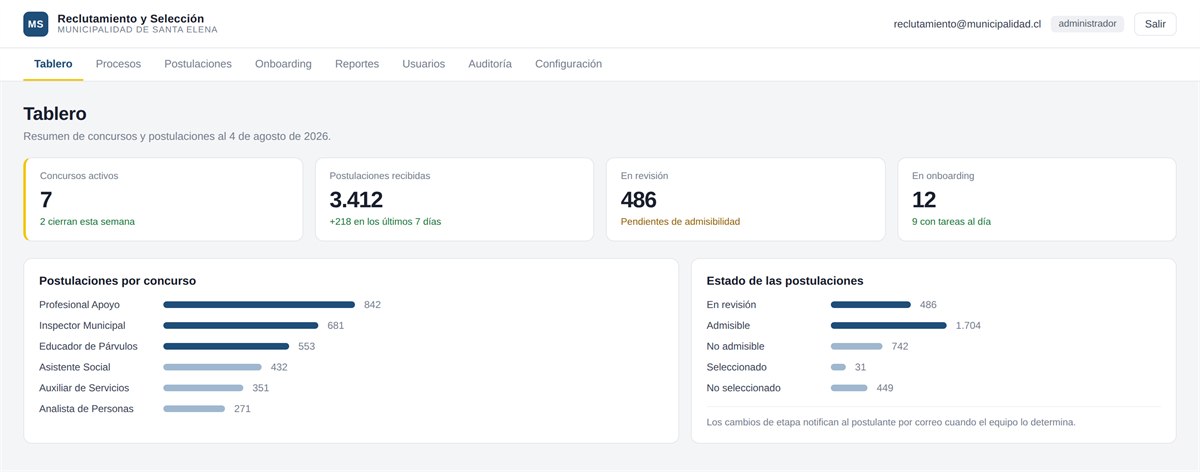
Platform dashboard showing active vacancies and application status
3.000+ Applications per vacancy validated in load testing
99,98% Availability committed by SLA
TIER III Our own datacenter in Santiago
0 Installations on client machines
What it solves

The vacancy stops living in the inbox

It replaces documents received by email, spreadsheets and shared folders with a single process that is traceable and auditable from start to finish.

  • Every application gets a unique sequential reference number with the institution's prefix.
  • The system validates the Chilean ID, the required documents and duplicate applications.
  • Applicants receive an automatic receipt with reference number, date and time.
  • Informed consent for terms, privacy and inclusion from the very first step.

Public portal

People browse open vacancies and apply online with their documents attached, without creating an account, from a computer or a phone.

Admin panel

The HR team manages vacancies, reviews applications by stage, notifies results and coordinates onboarding, each person with their own role and permissions.

Everything it includes

The full cycle, module by module

Every stage of the process has its place in the platform. Further down you can see, feature by feature, what each plan includes.

Public application portal

  • List of open vacancies with the institution's branding
  • Responsive design: desktop, tablet and phone
  • Online application without creating an account
  • Unique sequential reference number per application, with the institution's prefix
+8 more features

Vacancy management

  • Create, edit, publish, close and archive vacancies
  • Definition of document requirements per vacancy
  • Automatic application closing date and time
  • Application limit per vacancy
+2 more features

Application review

  • Application inbox with filters by stage
  • Search by name, ID, reference number or email
  • Five stages: under review, eligible, not eligible, selected and not selected
  • Reason recorded when an application is declared not eligible
+3 more features

Email notifications

  • Automatic receipt for the application received
  • Manual sending of stage-change notifications
  • Email templates the institution can edit
  • Dynamic variables: name, reference number, vacancy, reason, date and time
+1 more features

Onboarding

  • Onboarding task list per selected person
  • Owners and deadlines assigned per task
  • Completion checks and progress tracking

Reporting and traceability

  • Dashboard with vacancy and application metrics
  • Export of results to Excel and CSV
  • Audit log with user, date and IP address
  • Audit viewer available from the admin panel

Users and roles

  • Team accounts with role-based access
  • Available roles: administrator and analyst
  • Additional roles: onboarding, collaborator and committee
  • Creating, editing, activating and deleting users
+1 more features

Customisation

  • Logo, institutional colours and favicon
  • Cover image and public portal texts
  • Editable legal texts: terms, privacy and inclusion
  • Institutional reference prefix and contact email
+1 more features

Infrastructure and security

  • Hosting in our own TIER III datacenter in Santiago
  • SSL certificate and encrypted traffic (HTTPS)
  • Regular automatic backups
  • Backup download from the admin panel
+3 more features

Support

  • Email support during business hours
  • Help desk with tickets and follow-up
  • Priority incident handling
  • Regular coordination meetings
Inside the platform

This is how the HR team uses it

Real screens from the system. Click any of them to see it in detail.

Dashboard Active vacancies and application status at a glance.
Processes Published and draft vacancies, with their closing dates.
Applications Inbox of applications received per vacancy, filtered by stage.
Applicant record Documents attached per requirement and the full history of the application.
Public portal Open vacancies with the institution's own branding.
Mobile application People apply from their phone, step by step and without creating an account.
System modules An overview of the sections that make up the platform.
The platform Recruitment, selection and onboarding in one place.

Dashboard

Active vacancies and application status at a glance.

Processes

Published and draft vacancies, with their closing dates.

Applications

Inbox of applications received per vacancy, filtered by stage.

Applicant record

Documents attached per requirement and the full history of the application.

Public portal

Open vacancies with the institution's own branding.

Mobile application

People apply from their phone, step by step and without creating an account.

System modules

An overview of the sections that make up the platform.

The platform

Recruitment, selection and onboarding in one place.

The screenshots show the platform in operation; the institution and the data on screen are for demonstration purposes.

Plans

Two plans, depending on the size of the institution

Both include hosting in our own datacenter, updates, corrective maintenance, help desk support and a 99,98% SLA. Net prices in Chilean pesos, excluding VAT.

ESENCIAL

For institutions with limited recruitment processes and a small team in charge.

$150.000/mo · + VAT Monthly billing
  • Public application portal with the institution's branding
  • Unique sequential reference number and automatic ID validation
  • Up to 5 active vacancies at a time
  • Up to 1,500 applications per year
  • Up to 3 team users · 10 GB of documents
  • Metrics dashboard and export to Excel and CSV
  • 99.98% SLA and help desk support

Implementation: $390.000one-time · + VAT Free with the annual plan

Request a proposal

Implementation is free on any plan purchased annually. It includes loading the institution's branding, the initial setup of vacancies and requirements, creating the team accounts and one training session.

Capacity

The limits of each plan, in numbers

CapacityESENCIALINSTITUCIONAL
Active vacancies at a timeUp to 5Unlimited
Applications per yearUp to 1,500Unlimited
Team usersUp to 3Unlimited
Document storage10 GB100 GB
Available roles25
BackupsAutomaticAutomatic and downloadable
Committed availability99.98% with SLA99.98% with SLA
SupportEmail and help deskPriority, with meetings

Storage and application limits can be increased on either plan with a monthly add-on.

Comparison

What each plan includes, feature by feature

Feature ESENCIAL $150.000/mo · + VAT INSTITUCIONAL $290.000/mo · + VAT
Public application portal
List of open vacancies with the institution's brandingIncludedIncluded
Responsive design: desktop, tablet and phoneIncludedIncluded
Online application without creating an accountIncludedIncluded
Unique sequential reference number per application, with the institution's prefixIncludedIncluded
Document upload per requirement, with validation of mandatory itemsIncludedIncluded
Several files per requirement (e.g. both sides of an ID card)IncludedIncluded
Automatic validation of the Chilean RUTIncludedIncluded
Automatic email receipt with reference number, date and timeIncludedIncluded
Informed consent for terms, privacy and inclusionIncludedIncluded
Duplicate application control by ID numberIncludedIncluded
Different requirements by applicant type (internal or external)Not includedIncluded
Internal mobility vacancies, visible only to staffNot includedIncluded
Vacancy management
Create, edit, publish, close and archive vacanciesIncludedIncluded
Definition of document requirements per vacancyIncludedIncluded
Automatic application closing date and timeIncludedIncluded
Application limit per vacancyIncludedIncluded
Active vacancies at a timeIncludedIncluded
Downloadable annexes and terms per vacancyNot includedIncluded
Application review
Application inbox with filters by stageIncludedIncluded
Search by name, ID, reference number or emailIncludedIncluded
Five stages: under review, eligible, not eligible, selected and not selectedIncludedIncluded
Reason recorded when an application is declared not eligibleIncludedIncluded
Document download with a recognisable requirement nameIncludedIncluded
Document preview without downloading (PDF and images)Not includedIncluded
Selection committee with restricted access to the evaluationNot includedIncluded
Email notifications
Automatic receipt for the application receivedIncludedIncluded
Manual sending of stage-change notificationsIncludedIncluded
Email templates the institution can editNot includedIncluded
Dynamic variables: name, reference number, vacancy, reason, date and timeNot includedIncluded
The institution's own mail server (SMTP)Not includedIncluded
Onboarding
Onboarding task list per selected personNot includedIncluded
Owners and deadlines assigned per taskNot includedIncluded
Completion checks and progress trackingNot includedIncluded
Reporting and traceability
Dashboard with vacancy and application metricsIncludedIncluded
Export of results to Excel and CSVIncludedIncluded
Audit log with user, date and IP addressNot includedIncluded
Audit viewer available from the admin panelNot includedIncluded
Users and roles
Team accounts with role-based accessIncludedIncluded
Available roles: administrator and analystIncludedIncluded
Additional roles: onboarding, collaborator and committeeNot includedIncluded
Creating, editing, activating and deleting usersIncludedIncluded
Password changes managed by the administratorIncludedIncluded
Customisation
Logo, institutional colours and faviconIncludedIncluded
Cover image and public portal textsIncludedIncluded
Editable legal texts: terms, privacy and inclusionNot includedIncluded
Institutional reference prefix and contact emailIncludedIncluded
The institution's own domainNot includedIncluded
Infrastructure and security
Hosting in our own TIER III datacenter in SantiagoIncludedIncluded
SSL certificate and encrypted traffic (HTTPS)IncludedIncluded
Regular automatic backupsIncludedIncluded
Backup download from the admin panelNot includedIncluded
Failover server in a second datacenterNot includedIncluded
Service level agreement of 99.98% availabilityIncludedIncluded
24/7 infrastructure monitoringIncludedIncluded
Support
Email support during business hoursIncludedIncluded
Help desk with tickets and follow-upIncludedIncluded
Priority incident handlingNot includedIncluded
Regular coordination meetingsNot includedIncluded
Why this platform

It is not generic software forced to fit

Built for the Chilean public sector

Sequential reference numbers, ID validation, informed consent and traceability under current regulations come as standard, not as later add-ons.

Own infrastructure

Hosting does not depend on third parties: it runs on our own TIER III datacenters in Santiago, monitored around the clock.

Proven capacity

Performance with thousands of applications and concurrent users is verified by load testing, not estimated.

No installation

It runs in the browser on any device. The institution does not manage servers or software licences.

Trust

Public and private institutions trust us

We work with municipalities, hospitals, universities and organizations across Chile, in both the public and private sectors.

Service terms

What the contract covers, without ambiguity

ItemDetail
ModelSoftware as a service (SaaS). No installation or client servers required.
HostingIncluded in both plans, in our own TIER III datacenter in Santiago.
UpdatesIncluded. Platform improvements are applied at no extra cost.
Corrective maintenanceIncluded. Correction of errors affecting operation.
Custom developmentNot included. Features specific to one institution are quoted separately.
Institutional dataIt belongs to the institution and is exported and handed over when the service ends.
Regulatory complianceLaw 19,628 as amended by Law 21,719 (personal data) and Law 21,015 (inclusion).
CommitmentNo minimum commitment on the monthly plan. The annual plan is billed for the full period.
Payment methods

Billing with VAT in Chile

We invoice the institution, with a purchase order where applicable.

WebPay PlusMercadoPagoTransferencia

Frequently asked questions

Does anything need to be installed at the institution?

No. It is software as a service: it runs in the browser on any device. The institution does not manage servers or licences, and hosting is included in both plans.

Do people need an account to apply?

No. Applications are made online without prior registration: the person fills in their details, attaches the documents for each requirement and receives an automatic receipt with reference number, date and time.

What availability is committed to?

A service level agreement of 99,98% availability, on both plans, with round-the-clock infrastructure monitoring.

Do both plans include support?

Yes. Both include email support during business hours and a help desk with tickets and follow-up. The Institucional plan adds priority incident handling and regular coordination meetings.

Can we use the institution's domain and branding?

The public portal is customised with the institution's logo, colours, favicon, cover image and texts on both plans. Using your own domain is available on the Institucional plan.

What happens to applicants' documents?

The data belongs to the institution and is exported and handed over when the service ends. Processing complies with Law 19,628 as amended by Law 21,719 and with Law 21,015 on labour inclusion.

What does implementation include?

Loading the branding, the initial setup of vacancies and requirements, creating the team accounts and one training session. It is free on any plan purchased annually.

What if we exceed the plan limits?

Storage and application limits can be increased on either plan with a monthly add-on, without having to change plan.

Can we request specific features?

General platform improvements are included at no extra cost. Custom development for a particular institution is quoted separately with our software team.

Is there a minimum commitment?

Not on the monthly plan. The annual plan is billed for the full period and is the one that includes free implementation.

See the platform with your own vacancies

We will schedule a demo with your institution's HR team and go through together how your process would look on the platform.